The Hub API Docs Security About Get a Demo
The Hub · In production today

Your work, finally remembered.

Email, projects, meetings, people, chat — one workspace, one memory.

Your smart inbox triages itself. Projects write their own briefings as work happens. People dossiers build automatically for everyone you work with.

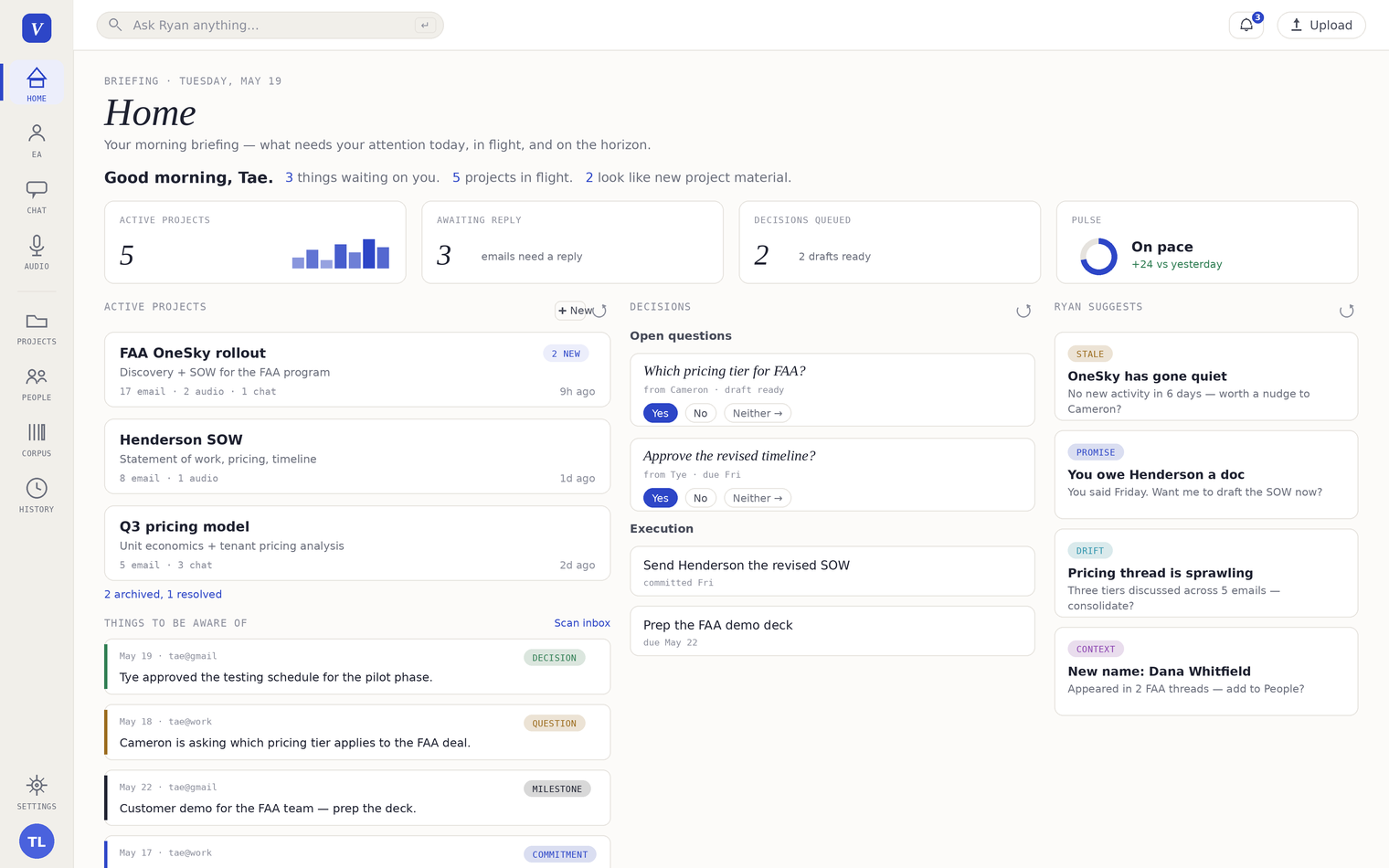
The Hub · Home
The Hub's Home screen: morning briefing with Pulse dial, active projects, decision cards, and the assistant's suggestions
What it does

Five surfaces. One memory.

Each surface is a different angle on the same brain — your inbox, your projects, your meetings, your contacts. The assistant is always in context, and every answer comes with a citation you can click.

Inbox

An inbox that triages itself — and decides for you.

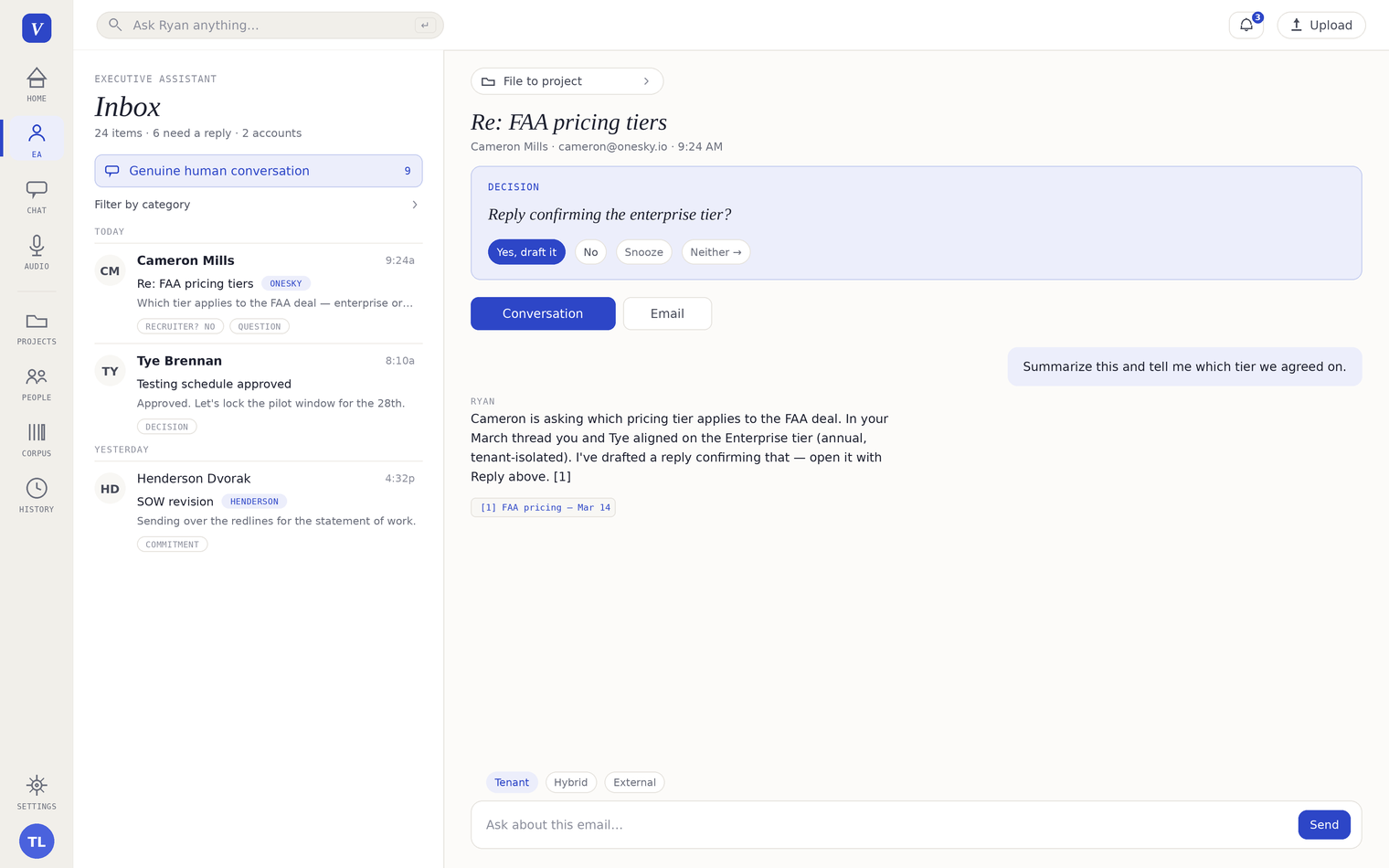
Your assistant reads Gmail, Outlook, and IMAP, classifies every message, and pins real human conversations to the top. One-tap decision cards — Yes, No, Snooze, Neither — draft or file in a click, with Undo.

Why you care You stop reading 200 emails to find the 8 that matter. The ones that matter arrive with a decision proposed and a draft already written.
Smart inbox: selected email with one-tap decision card (Yes / No / Snooze / Neither), in-context assistant reply with citations, and mode picker
Projects

Every project writes its own briefing.

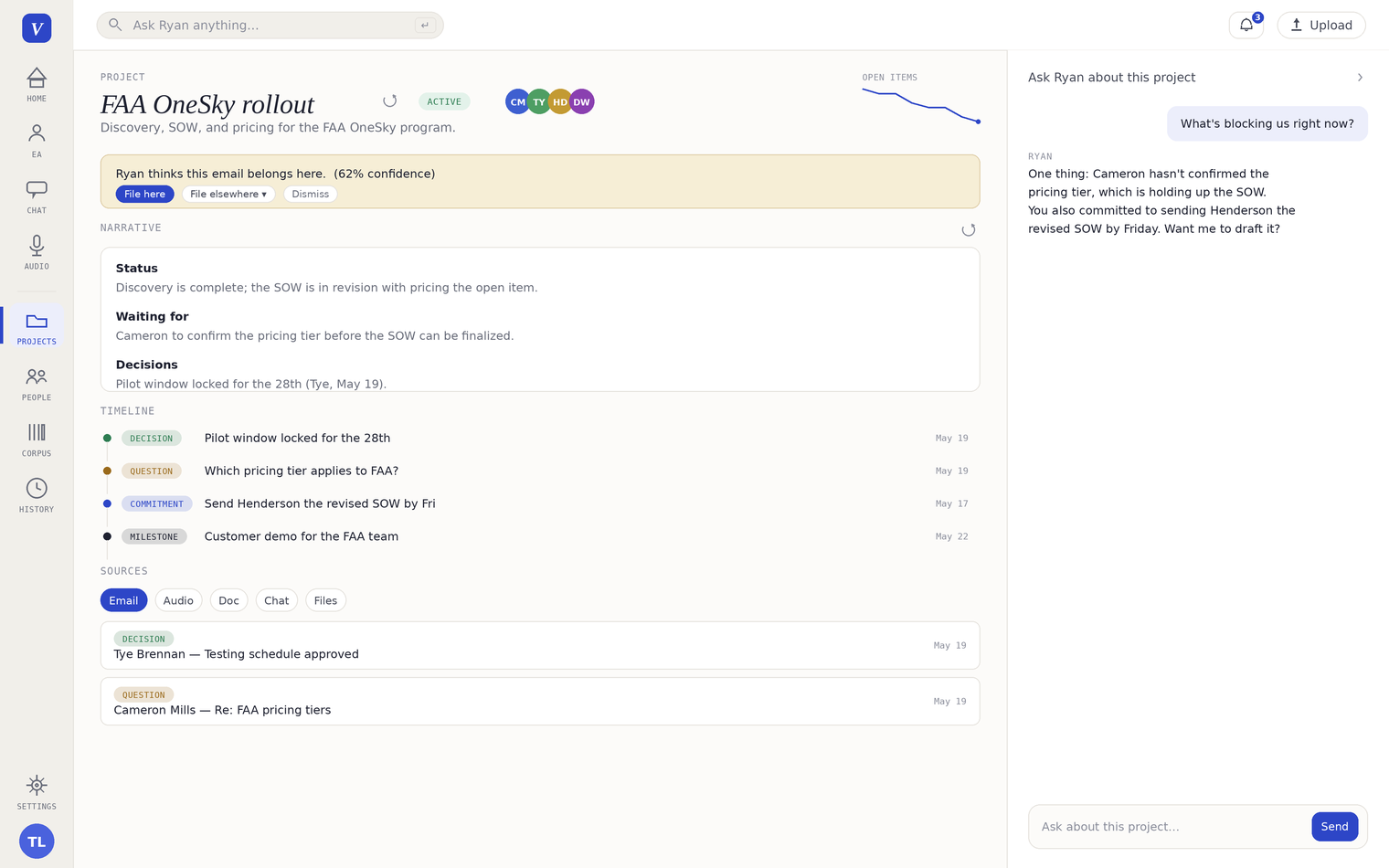
A project is a durable workspace for sustained work. File emails, meetings, and documents to it — the briefing and timeline update themselves. Events get tagged as decisions, questions, commitments, milestones, or FYIs. Ask project chat to "make a one-pager" or "build a deck" — your assistant drafts it, a top-tier model reviews it, and the finished Word, PowerPoint, or Excel file lands in the project's sources.

Why you care You walk into the meeting already briefed. Nothing falls through because nobody remembered to follow up. You produce a real deliverable in the time it used to take to write the outline.
Project workspace: auto-generated briefing, categorized timeline of decisions and commitments, source list, project-aware chat
Audio & Meetings

Meetings stop disappearing.

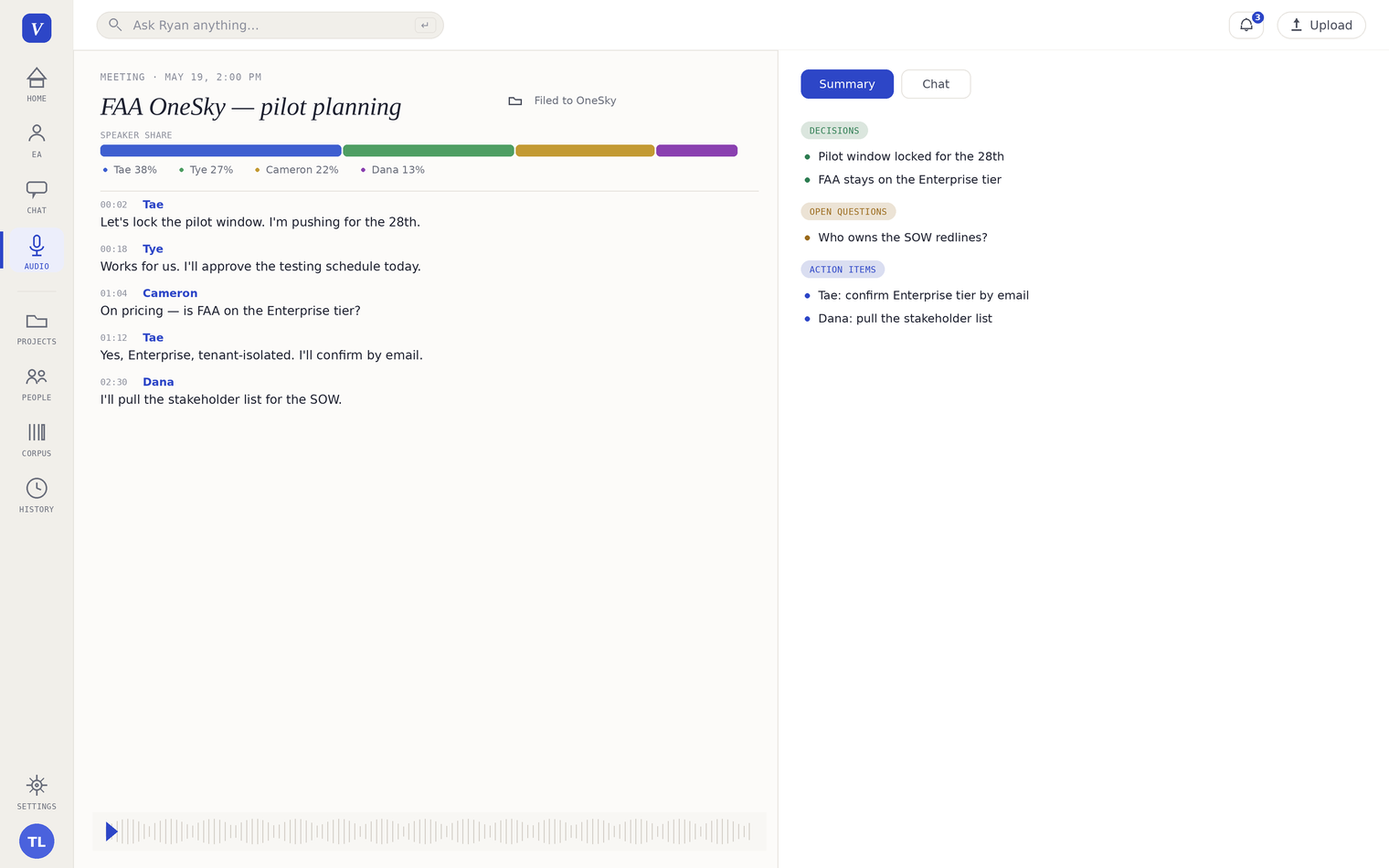
Record any meeting in the Hub. Live streaming transcription with speaker labels — ask the assistant questions during the meeting. When you stop, Virideon writes a summary with decisions, open questions, and action items. Click any line of the transcript to jump playback to that moment. File the meeting to a project in one click.

Why you care What got said in the room becomes part of the record — searchable, linkable, citable — instead of a Slack note someone took and then lost.
Meeting detail page: speaker share, timestamped transcript, automatic summary with decisions, questions, and action items
People

A dossier for everyone you work with.

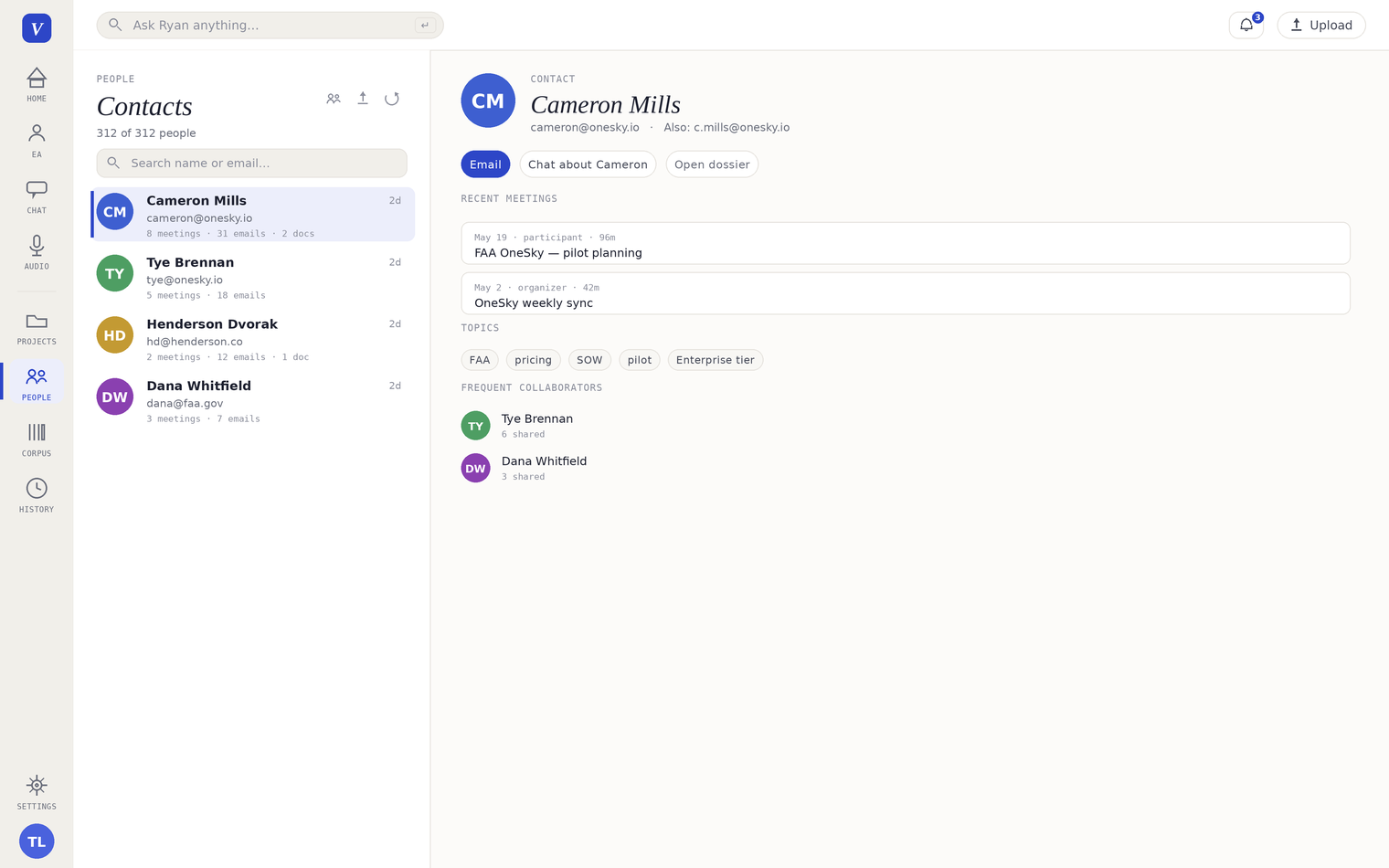
People builds an auto-curated profile for everyone who shows up in your meetings or email — no manual entry. Each dossier carries recent meetings, topics, frequent collaborators, and open decisions involving them. Say "tell me about Cameron" and it pulls everything you know. Auto-merge spots duplicates and combines them, with you confirming.

Why you care Before any call, in 10 seconds, you have what you'd need an EA to spend half an hour pulling together — and a real one couldn't pull from the meetings and emails they weren't on.
People dossier: contact list, selected contact's recent meetings, topics, frequent collaborators
Chat

A chat that already knows the context.

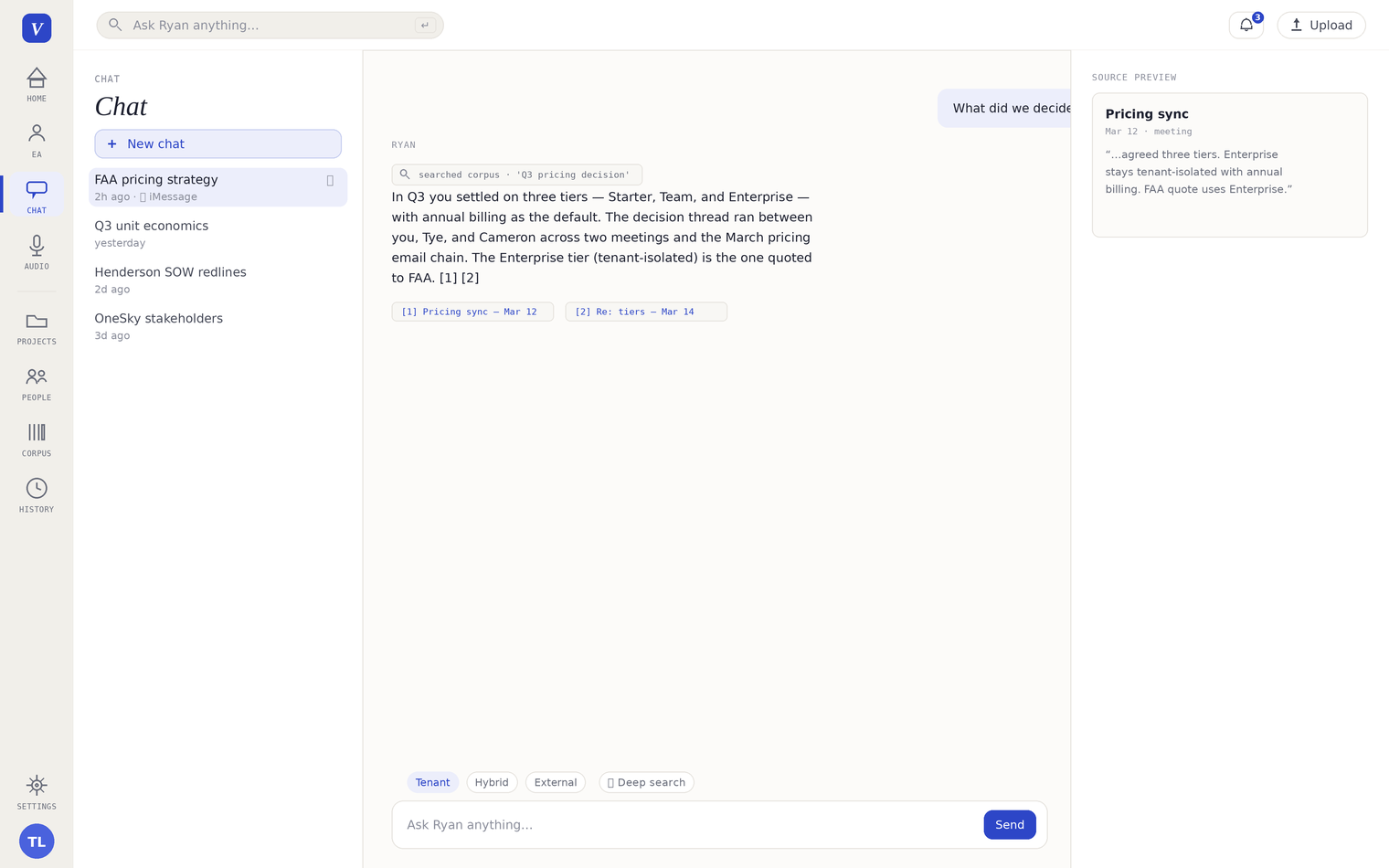
Ask anything in plain language. The Hub already has your inbox, your meetings, your documents, your audio — and returns answers with citations to the exact source, time, and person. A persistent chat sits alongside every project, meeting, and email. Start a text with @V from your phone and your assistant answers from iMessage.

Why you care You stop being the human glue between an AI and your own work. The AI starts where you'd want it to start — every time.
Chat with the assistant: question, cited answer, Source Preview panel, mode picker for Tenant / Hybrid / External plus Deep search
How you get started

From connect to first answer.

No long integration project. No "we'll be ready in six months." A Hub that's working on your real data within a day.

1
Connect
5 minutes. OAuth your sources.

Gmail or Outlook, calendar, files. We support what your work already runs through. Connectors authenticate per-tenant — your tokens, your data.

2
Ingest
The Hub catches up on your work.

The last 90 days — emails, meetings, decisions, the people behind them — resolved into one knowledge graph. Usually done overnight.

3
Use
Smart inbox triages the next morning.

Projects build themselves as work happens. People dossiers populate as you meet. The longer it runs, the deeper the memory.

Memory compounds. Day 30 doesn't look like day 1.

A week with the Hub

What changes when memory finally works.

A composite of what early users report. Your week looks different — quieter, faster, less reactive.

An hour minutes
Email triage

A morning's worth of triage collapsed into one decision pass.

Monday · 7:00am

The morning starts already briefed.

Home shows three things you should know — a follow-up that stalled, a contradiction across two threads, and a meeting outcome that needs to land in the status doc. Your assistant already drafted the relevant replies.

4 weeks 5 seconds
Meeting prep

Context across decisions, threads, and people, synthesized on demand.

Tuesday · 10:30am

Every meeting starts with context.

The project page shows the last 4 weeks as a single narrative: what changed, what was decided, what's still open. You stop asking "where are we again?"

Hours seconds
Decision archaeology

"When did we decide that?" — every answer comes with the thread, timestamp, and source.

Thursday · 4:15pm

Hard questions answered in seconds.

"When did we commit to that, and who approved it?" You ask project chat. It comes back with the exact thread, the timestamp, the person, and a link to the source.

Reactive done by Wednesday
Friday back

The week's reactive work happens once — not three times. Friday becomes for the real work.

Friday · 12:00pm

Friday afternoon goes back to actual work.

Not reconstructing context. Not chasing status. Not rebuilding a deck because last week's version got lost. The week's reactive work is already done — by Wednesday.

Trust & deployment

Where it runs. How it stays yours.

No "import everything into a new app." The Hub connects to where your work already happens — and your data lives in your tenant, not a shared corpus.

Connects to your work

New connectors monthly. Don't see yours? We build them with design partners.

Stays yours
Single-tenant No training Your model Air-gap capable
Full security details
Design Partner Program

We pick design partners carefully.

The Hub is in production today, and we onboard design partners selectively — teams whose work depends on memory and who'll tell us honestly what's landing and what isn't. The product earns more from working with the right people than from being on the largest number of dashboards.

What design partners get
  • The Hub on your real work — set up with you, not handed to you.
  • Direct line to the founders. Weekly check-ins. Fast iteration on what's working.
  • Pricing reflects engagement depth — set per partner, not off a list.
  • Light-touch input on what we build next.
A good fit looks like
  • An individual, small team, or program area whose work depends on memory.
  • Someone who'd rather have a tool that actually knows them than a feature list.
  • Willing to talk to us about what's working and what isn't.
  • Comfortable with the product still being in active design.

See the Hub on your data.

30 minutes. Your inbox, your meetings, your projects. No canned demo.

Response Time

Usually within a few hours

Live Demo

30 minutes, on your data

Tell us what you'd want to see

We'll follow up to schedule a live walkthrough — on your inbox, your meetings, your projects.

Thanks for reaching out.

We'll be in touch within a few hours to schedule your demo.